As was foretold, we've added advertisements to the forums! If you have questions, or if you encounter any bugs, please visit this thread: https://forums.penny-arcade.com/discussion/240191/forum-advertisement-faq-and-reports-thread/
Options
Unofficial PAX IRC Channel - Now with extra help
BigRed Seattle, WARegistered User regular
Seattle, WARegistered User regular
So, Moe wanted me to make a new, updated post to the (Unofficial) PAX IRC channel. So we have an easily visible location to help those out trying to connect to the channel. Plus the last thread was two years old :P Plus im sure moe is too busy to do all this.
The IRC channel is Just a gathering place for members of the community so come join if you want to chat with everyone or if you are just bored Someone is almost always on to talk with.
If you already know how to use IRC with your client of choice:
irc.slashnet.org
#paforums_pax
When you join, be sure to register your nick with nickserv and either PM me or Moe to be added to the channel access list so you get autovoiced. Or you can post here asking for it. Im online the majority of the day and will be watching this thread and my PMs in channel.
Since people are confused about it, this is required since we have a major spammer/troll problem in the channel.
Until you do that, you can PM anybody with a @ or % symbol in front of their name to get voiced so you can participate
If you dont know how to use nickserv, there's a section in the tutorials below on how to do that.
Here are a few tutorials on how to get connected if you are unfamiliar with IRC (most of us are old and remember it though, heh)
The IRC channel is Just a gathering place for members of the community so come join if you want to chat with everyone or if you are just bored
Someone is almost always on to talk with.If you already know how to use IRC with your client of choice:
irc.slashnet.org
#paforums_pax
When you join, be sure to register your nick with nickserv and either PM me or Moe to be added to the channel access list so you get autovoiced. Or you can post here asking for it. Im online the majority of the day and will be watching this thread and my PMs in channel.
Since people are confused about it, this is required since we have a major spammer/troll problem in the channel.
Until you do that, you can PM anybody with a @ or % symbol in front of their name to get voiced so you can participate
If you dont know how to use nickserv, there's a section in the tutorials below on how to do that.
Here are a few tutorials on how to get connected if you are unfamiliar with IRC (most of us are old and remember it though, heh)
CONNECTING TO IRC:
Follow the arrows in the pics, I made this easy to not require me to type anything :P
Download and install mirc
http://mirc.com
(ITS FREE, the trial doesnt expire)
Now we move onto:
REGISTERING YOUR NICKNAME
(just doing a copy-pasta of my earlier post)
Next:
LINKING NICKS TO YOUR REGISTERED NICKNAME
SETTING UP PERFORM ON MIRC SO YOU AUTO IDENTIFY AND AUTO JOIN THE CHANNEL:
Follow the arrows in the pics, I made this easy to not require me to type anything :P
Download and install mirc
http://mirc.com
(ITS FREE, the trial doesnt expire)
Step 1:
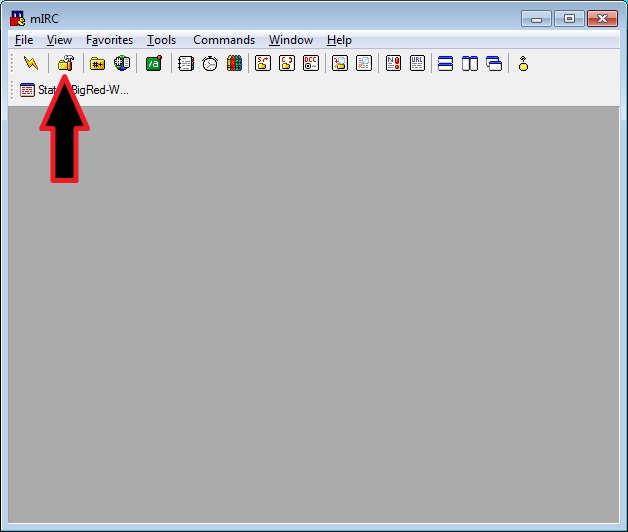 Step 2:
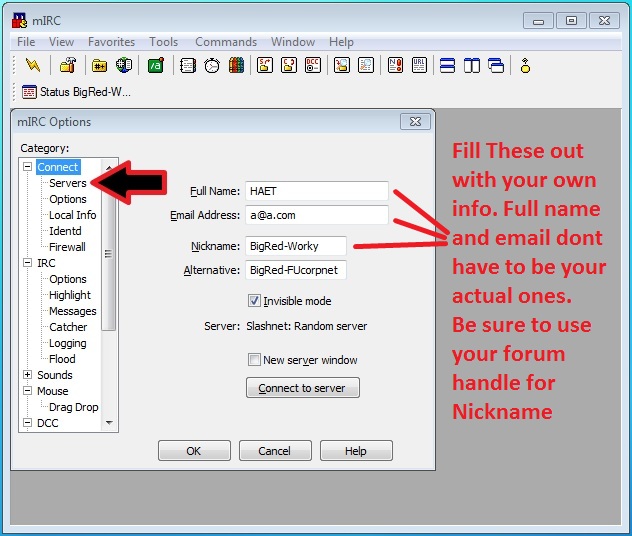 Step 3:
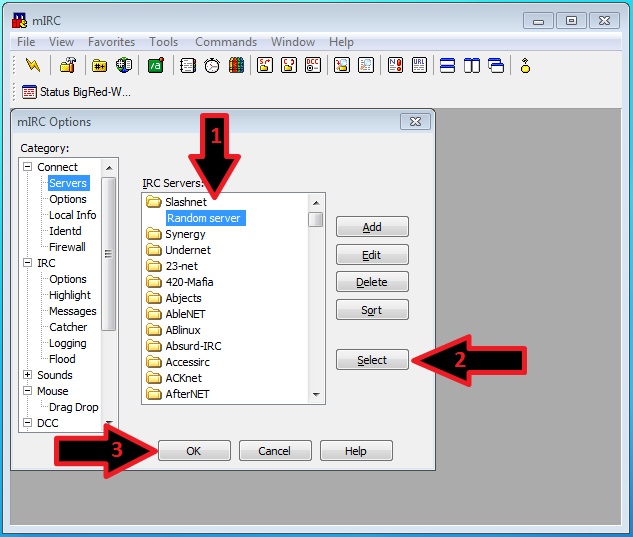 Step 4:
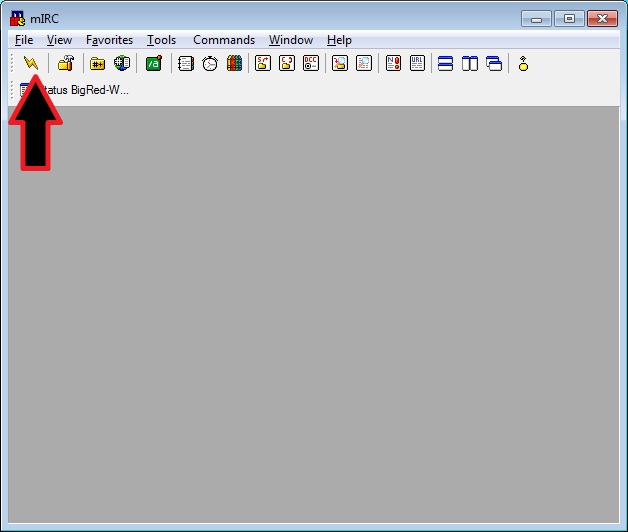 Step 5:
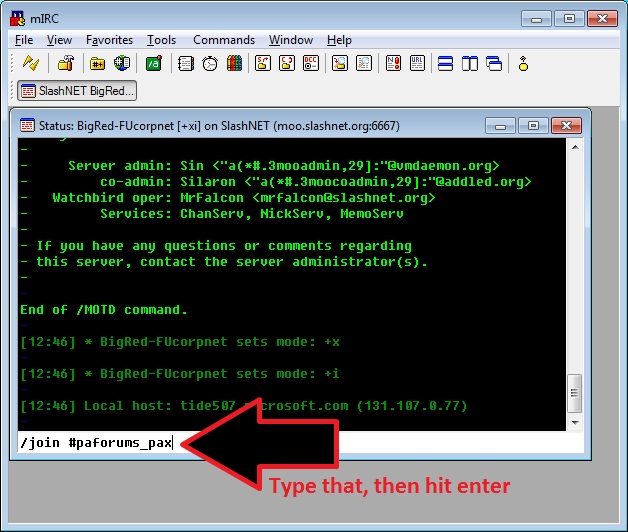
Now we move onto:
REGISTERING YOUR NICKNAME
(just doing a copy-pasta of my earlier post)
So... The Channel will be running with moderation on, anybody else who joins will need to register their nick and PM either me or moe (on IRC) to be added to the channel access list so you get auto-voiced so you can talk in the channel.
Whenever I am in the channel ill be proactive for a while at PMing new people and walking them through the register process, for now heres some short instructions.
Instructions:
Go to the server window (depends what client you use) and type this:
password = what password to register your nick under
email = your email addy to recieve a confirmation #
it will then ask you to do this:
code = the code you got in your email
Then when Every time you reconnect to slashnet you will need to type this
password = the password you used to register your nick with
Then you are all set Just be sure to PM me or moe on irc (whichever you see active) to get added to the access list.
Or you can post in here asking to be added, we will check here too
Whenever I am in the channel ill be proactive for a while at PMing new people and walking them through the register process, for now heres some short instructions.
Instructions:
Go to the server window (depends what client you use) and type this:
/msg nickserv register password email
password = what password to register your nick under
email = your email addy to recieve a confirmation #
it will then ask you to do this:
/msg nickserv auth code
code = the code you got in your email
Then when Every time you reconnect to slashnet you will need to type this
/msg nickserv identify password
password = the password you used to register your nick with
Then you are all set
Just be sure to PM me or moe on irc (whichever you see active) to get added to the access list.Or you can post in here asking to be added, we will check here too
Next:
LINKING NICKS TO YOUR REGISTERED NICKNAME
This is pretty simple. When you are logged into slashnet (and your nick is identified) all you have to do is type this:
so, I have my BigRed nick thats my registered one, then BigRed-Worky is linked to that.
after you link a nick, when you login to slashnet. You will have to identify with the same password as your registered nick.
nickname = the other nick you want linked/msg nickserv link nickname
so, I have my BigRed nick thats my registered one, then BigRed-Worky is linked to that.
after you link a nick, when you login to slashnet. You will have to identify with the same password as your registered nick.
SETTING UP PERFORM ON MIRC SO YOU AUTO IDENTIFY AND AUTO JOIN THE CHANNEL:
Step 1:
Step 2:
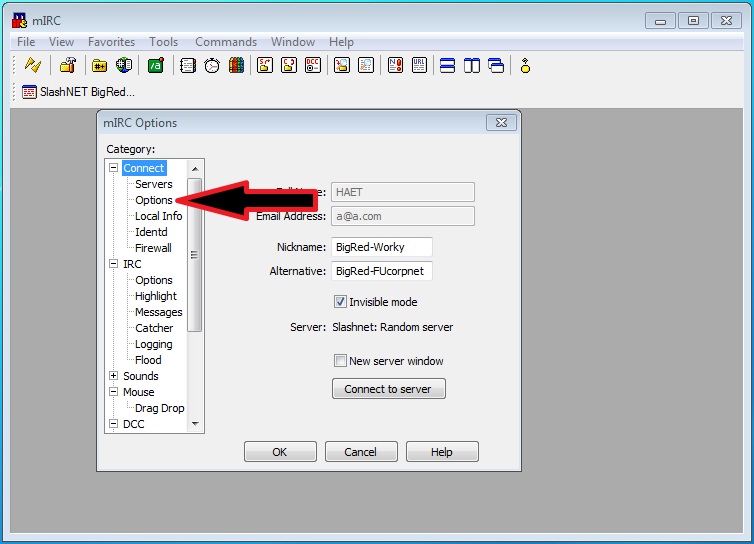 Step 3:
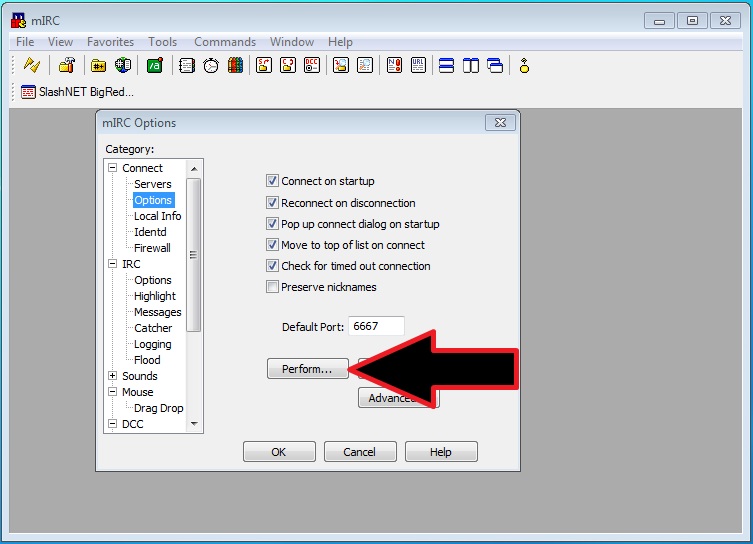 Step 4:
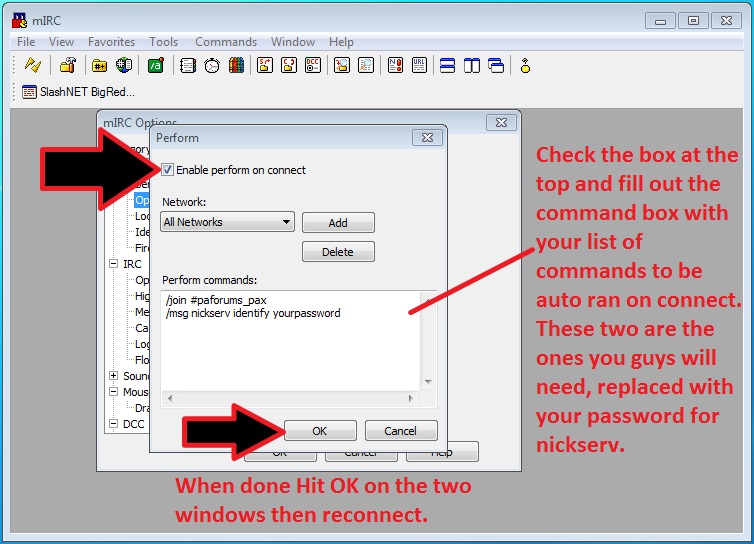
<MoeFwacky> besides, BigRed-Worky is right
BigRed on
0
This discussion has been closed.
Posts
For windows, If you don't want to use mirc then I would suggest looking at the list here. I'd recommend SilvereX since it is free and has some great extensibility with all the other languages. But that may be because I'm a programming dork.
For linux, I would again suggest x-chat. (seeing a pattern here?)
General rule of thumb, use an IRC client that is an actual IRC client and not an everything client, usually the everything clients aren't done very well. I'm looking at you pidgin.
Passes: ☑ ▬ Hotel: ☑ ▬ Flight: [color=red]☑[/color]
Added "DaNerd" to the access list
If your nick is registered with nickserv (directions in OP), let me know and I will add you so you will be auto-voiced
If you dont have a registered nick then you need to do so before atuo-voicing can be turned on for your nick.
PAX East Trading Card Organizer | Twitter | Google+
3DS Friend Code: 2707-1614-5576
PAX Prime 2014 Buttoneering!
Added
Also these days all IRC clients can run multiple networks, whats another connection?
I have been just using Pidgin to use IRC. That works great for me! I use it to connect to 8, count em, 8 connections. AIM, Yahoo, MSN, GoogleTalk, MySpace, FaceBook, Twitter and now IRC. If you have any questions on getting IRC to work with Pidgin, ask. It may be too weak of a client for some but it works for me.
Added
Thanks
Since I dont own a mac...
Does liger want to volunteer?
Should do it in the same format (pictures with arrows and such)
I mean I can barely navigate my way back into the channel normally if my pc dies, let alone getting that set properly. Someone helped give it to me in channel the other night, but then my main pc died before I could get it set right.
If/When I find myself on my own laptop again, sure.
First off, you need to download Colloquy from http://colloquy.info/ and install it.
(IT'S FREE, no trials, no nagging)
Step 1:
-Fill in your Nickname, which is what will be the name displayed. It should probably match your forum name.
-Under Chat Server, enter irc.slashnet.org
-Toggle Details so you see more options below, and then check "Remember this connection"
-Enter something under Username and Real Name, they don't actually have to be real.
Your window should look something along the lines of this:
Click Connect at the bottom
Step 2:
Click on your new connection and then click "Join Room" on the toolbar above. Enter #paforums_pax into the Chat Room field and hit Join.
Done!
Chat Away!
Registering nicks and linking more nicks is done the same way as in the OP.
AUTO-IDENTIFY AND AUTO-JOIN
Step 1:
This will bring this window:
Go ahead and enter your nickserv password in the Password box under Nickname (NOT Server Password). Don't close this window yet.
Step 2:
-Check "Connect on launch"
-Click the + button beneath Join Rooms:, and in that field enter #paforums_pax
It should look like this:
Once that's done, you can close the window.
Done!
If I've made any mistakes or need to add/clarify anything, let me know
The Sixth Annual Triwizard Drinking Tournament Part 1 |
Pokecrawl Episode 4: The Power Of One!
Portalflip
Pokemon X: Atlus | 3539-8807-3813
I mean I'm not going to argue about it, but I just wanted to throw my opinion in there since it seems to be being assumed that silence equals agreement
It's available...It's under My Account settings.
My nick is Tajah
[15:02] Tajah: I like you BR but I'm not letting you nom my box
[15:02] BigRed-Worky: Did I mention I hate you all? cause i do
PAX Twitter Shitter~*~ Retired Bar Liaison: 2nd, 3rd, & 4th Annual Triwizard Drinking Tournament~*~
PAX East Trading Card Organizer | Twitter | Google+